
ForecastFit
ForecastFit
How I built a weather-based clothing app from scratch
ForecastFit is currently in closed testing — see the end of this page if you’d like an invite.
In early 2025, I was getting ready to head out for a run and found myself doing what I usually do in colder months. Standing in the hallway, trying to decide what to wear.
It was never just about temperature. It was the wind, the damp air, whether I would warm up after five minutes, or regret not wearing gloves halfway through.
I remember thinking there should be a simple app that just tells you what to wear.
I could not find one that worked the way I wanted, so I decided to build it myself.
That became ForecastFit.
The Idea
The starting point was simple.
An app that looks at the weather and gives you a clear recommendation on what to wear.
No tracking.
No social features.
No complicated setup.
Open it, check it, go.
As I began building it, the idea naturally developed further.
Learning by Building
Before this project, I had not built a mobile app.
I chose Flutter so I could build for Android first while keeping the option open for iOS later. From there, it was a case of learning through doing.
I had to get comfortable with:
- Android Studio
- Dart
- Flutter widgets
- State management
- Asynchronous API calls
- Location permissions
There were plenty of moments where things did not work as expected. Widgets did not rebuild. API calls failed. State changes were not reflected in the UI.
Much of the progress came from testing, adjusting and restructuring parts of the app until they behaved properly.
The aim was not to follow a tutorial. It was to see if I could take an idea and turn it into something functional on my own.
Adding Live Weather
The first version relied on manual sliders for temperature and wind, with simple toggles for rain, snow and time of day. The recommendation updated instantly as values changed.
It worked, but it felt limited.
So I integrated a weather API and added location detection. That meant handling:
- API requests and JSON responses
- Loading and error states
- Unit conversion between metric and imperial
- Forecast data for future time slots
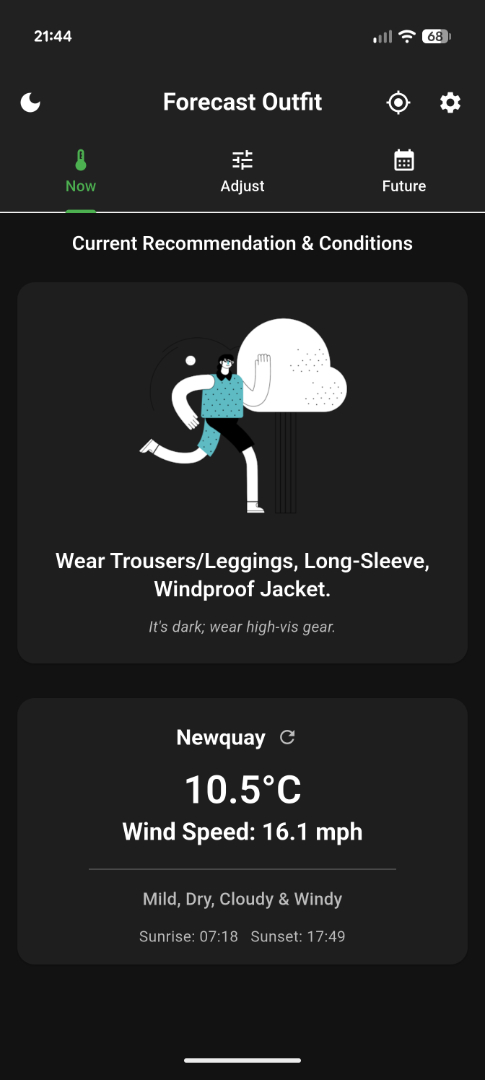
Once live weather data was fed directly into the recommendation logic, the app became far more useful. You could open it and see a real suggestion based on actual conditions.
Building the Logic
Fetching data was only part of it. Deciding what to do with that data was the real challenge.
Temperature alone is not enough.
Wind affects how it feels.
Rain changes what you need.
Time of day affects visibility.
People tolerate cold differently.
I built a rules-based system that factors in:
- Temperature ranges
- Wind impact
- Precipitation intensity
- Day or night conditions
- Personal comfort adjustments
Users can also define their own trigger points. For example, one person might wear gloves below 6 degrees, while someone else waits until 3 degrees.
That shift turned ForecastFit from a basic weather app into a personalised decision tool.
Keeping It Simple
Speed was important.
When you open the app, the recommendation appears immediately. There is no separate generate button. Everything updates automatically.
I also added independent unit toggles so users can choose Celsius or Fahrenheit, and kilometres per hour or miles per hour, without forcing everything to switch together.
Most of these decisions came from using the app myself and refining what felt unnecessary.
Moving Beyond Running
Although it started as a running app, the logic works for any outdoor activity.
Walking, hiking, cycling or general outdoor fitness all follow the same principle. What should I wear in these conditions?
Over time, it became more of an outdoor fitness clothing companion rather than a running-only tool.
The Role of AI
I wrote the code myself.
Throughout the process, I used AI tools to help troubleshoot issues, explain Flutter concepts and sense-check parts of the structure. It acted as a development partner rather than replacing the work.
Every solution still needed to be understood and implemented properly. It simply helped me learn faster.
Technical Overview
For those interested in the technical side:
- Built using Flutter and Dart
- Developed in Android Studio
- Integrates a weather API for live and forecast data
- Uses location services for automatic detection
- Handles asynchronous requests and state-driven UI updates
- Stores user preferences locally
- Supports independent metric and imperial units
- Separates the recommendation engine from the data source
Keeping the logic layer independent made it easier to evolve from manual inputs to live weather without rewriting the core system.
Why I Built It
ForecastFit was not created as a commercial product.
I built it to test myself. To learn mobile development properly. To solve a real, everyday problem.
It now lives on my phone.
I use it.
It works.
That was the goal.
Forecast Outfit is on the Play Store but only available to invited testers right now. If you’re interested, email me directly and I’ll add you.